The landscape of artificial intelligence in design has evolved at a breakneck pace. By 2026, the question is no longer whether an AI can generate a compelling image, but rather which AI can do it best, fastest, and most affordably. As high-end foundation models become more accessible, creatives, marketers, and casual users alike are hunting for the best free AI image generators that deliver professional-grade results without hefty subscription fees.
However, navigating the sea of "free" AI tools is challenging. Many platforms advertise as free but quickly lock their best features—like high-resolution downloads, commercial licensing, or advanced architectural models—behind strict paywalls or rapidly depleting credit systems. To help you cut through the noise, we have rigorously tested and analyzed the current market to bring you the definitive guide to the 5 best free AI image generators in 2026.
Whether you need photorealistic portraits, flawless typography for logos, scalable vector graphics, or an all-in-one creative powerhouse, this comprehensive review will guide you to the perfect tool for your workflow.
What Makes a Great Free AI Image Generator in 2026?
Before diving into our top picks, it is crucial to understand the criteria we used to evaluate these platforms. In 2026, the standards for AI image generation are incredibly high. A basic tool that generates blurry, anatomically incorrect images no longer makes the cut.
When evaluating the best free AI image generators, we considered the following five core pillars:
- Image Quality and Realism: The AI must produce high-fidelity visuals. We looked for exceptional handling of lighting, textures, human anatomy (especially hands and faces), and complex spatial relationships within the composition.
- Prompt Adherence (Fidelity): How closely does the generated image match the user's text prompt? The best tools understand nuanced instructions, negative prompts, and complex multi-subject descriptions without dropping crucial details.
- Text-Rendering Capabilities: Generating coherent, readable text within an image was a major hurdle in earlier AI eras. In 2026, top-tier generators must be able to visually render words accurately for uses in logos, posters, and memes.
- Generous Free Tiers: We evaluated the actual "freeness" of the platform. Does it offer a daily resetting token allowance? Are the free credits sufficient for meaningful ideation, or do they run out after just two or three prompts?
- Commercial Licensing: For professionals and creators, understanding the usage rights is vital. We prioritized platforms that are transparent about whether free-tier users can use generated images for commercial purposes or if they are restricted to personal use only.
Top 5 Free AI Image Generators Compared
To give you a clear overview before diving into the deep analysis, here is a quick comparison matrix of the best free AI image generators available this year.
Table 1: Quick Comparison Matrix
| Tool Name | Best For... | Free Tier Limit (Approx.) | Underlying Core Tech / Model | Commercial Use on Free Tier |
|---|---|---|---|---|
| Trynanobanana2 | All-in-One AI Creative Suite | Generous Trial / Aggregator | Multiple (inc. Gemini 2.5 Flash) | Varies by underlying model |
| ChatGPT | Conversational prompt editing | Strict limits on free accounts | GPT-4o / GPT-Image-1.5 | Yes |
| Ideogram | Accurate Typography & Logos | 10-20 prompts/day | Proprietary Ideogram Model | Yes (Public domain) |
| Leonardo.Ai | Artistic Control & Game Assets | 150 fast tokens/day | Custom Finetuned Models | Yes |
| Recraft AI | Vector Graphics & Designers | 30 credits/day | Proprietary Vector Model | No (Personal use only) |
1. Trynanobanana2: Best All-in-One AI Creative Suite
Trynanobanana2 offers a seamless all-in-one AI creation platform that redefines how users interact with multiple AI models. Instead of forcing you to choose between different specialized services and juggle multiple accounts, Trynanobanana2 aggregates the power of the industry's most cutting-edge video and image generation models into one unified dashboard.
With Trynanobanana2, you can easily access state-of-the-art architectures, including the lightning-fast capabilities derived from technologies like Google's Gemini 2.5 Flash, ensuring rapid generation times and incredibly high-resolution outputs.
Key Features:
- Model Aggregation: Why settle for one AI when you can try them all? Trynanobanana2 integrates various top-tier generation engines, allowing you to test the same prompt across different models simultaneously to find the exact style you need.
- Unified Interface: A clean, highly intuitive workspace designed for both beginners and experienced prompt engineers.
- Multi-Modal Capabilities: Beyond just static images, it supports advanced AI video generation, making it a true hub for digital creators.
- Seamless Workflow Ecosystem: Designed to streamline your creative process from initial ideation to final high-resolution export without ever leaving the platform.
Pros & Cons:
- Pros: Complete creative ecosystem; eliminates the need for multiple subscriptions; access to diverse, high-end models in one place; highly competitive rendering speeds.
- Cons: Because it aggregates multiple powerful models, users must be mindful of the specific licensing terms associated with whichever backend engine they select for their final output.
Start Creating Today: Ready to elevate your creative workflow? Explore the ultimate multi-model experience at Trynanobanana2.

2. ChatGPT (GPT-4o / GPT-Image-1.5): Best for Conversational Editing
OpenAI’s ChatGPT remains a titan in the AI space, and its integrated image generation capabilities in 2026—powered by advancements in the GPT-4o architecture—are phenomenal. What sets ChatGPT apart from traditional, interface-heavy image generators is its conversational nature.
Instead of meticulously tweaking sliders and writing complex, formatting-heavy prompt strings, you can simply "talk" to ChatGPT. If an image is almost perfect but the background color is wrong, you can just reply, "Change the sky to a sunset," and the AI understands the context and adjusts the image accordingly.
Key Features:
- Conversational Iteration: Refine images naturally through chat dialog rather than rewriting prompts from scratch.
- High Prompt Adherence: Exceptional at following complex, multi-subject instructions.
- Integrated Idea Generation: Use the LLM to brainstorm concepts, which it can immediately turn into visuals.
Pros & Cons:
- Pros: Unmatched ease of use; excellent for beginners; great at understanding abstract concepts and translating them into solid imagery.
- Cons: The free tier for ChatGPT is heavily restricted. Free users will hit generation limits very quickly compared to platforms with higher daily token allowances. Furthermore, its autoregressive nature means generation can sometimes feel slower than dedicated fast-diffusion models.
3. Ideogram: Best for Accurate Typography and Logos
For years, AI image generators struggled hilariously with text, often rendering incomprehensible alien runes instead of English words. In 2026, Ideogram is the undisputed leader in solving this problem. If your project requires accurate typography—whether you are designing a movie poster, a t-shirt graphic, a clean corporate logo, or a witty meme—Ideogram is the tool you need.
It boasts an astounding 90%+ accuracy rate for rendering text exactly as requested in the prompt. Furthermore, it understands layout, ensuring that text is integrated dynamically into the scene rather than just slapped on top like a cheap watermark.
Key Features:
- Flawless Text Rendering: Industry-leading accuracy for spelling and stylistic typography.
- Magic Prompt: An optional feature that takes your basic idea and automatically expands it into a highly detailed, optimized prompt using an LLM.
- Poster and Design Focus: Pre-trained styles specifically optimized for graphic design layouts.
Pros & Cons:
- Pros: Solves the AI text problem beautifully; great community feed for inspiration; the Magic Prompt feature practically guarantees a good-looking result even if your initial prompt is weak.
- Cons: The free tier is quite restrictive, offering only around 10 to 20 prompts per day. Additionally, all images generated on the free tier are public by default, making it less ideal for confidential project ideation.
4. Leonardo.Ai: Best for Artistic Control and Commercial Use
If you are a concept artist, game developer, or a creator who demands meticulous control over the artistic style of your generations, Leonardo.Ai offers one of the most robust platforms available in 2026. While it can be overwhelming for absolute beginners, professionals revere Leonardo for its depth.
Leonardo distinguishes itself by offering a massive library of fine-tuned models. Instead of one general-purpose engine, you can select models specifically trained for photorealism, vintage anime, isometric game assets, or 3D renders. Furthermore, it is one of the few platforms that offer generous commercial use rights entirely on its free tier.
Key Features:
- 150 Daily Fast Tokens: One of the most generous free tiers available, allowing users to generate dozens of images every single day as tokens reset daily.
- Custom Fine-Tuning: The ability to train your own custom models based on a specific dataset of images.
- Advanced Tools: Features like Image Guidance, rigorous ControlNet integration, and real-time canvas editing.
Pros & Cons:
- Pros: Incredible stylistic flexibility; very generous daily free allowance; explicit permission for commercial use on the free plan.
- Cons: The user interface resembles a complex professional software dashboard, presenting a steep learning curve. Like Ideogram, images generated on the free tier are public.
5. Recraft AI: Best for Vector Graphics and Designers
Recraft AI occupies a unique and highly valuable niche in the 2026 AI landscape: it is built from the ground up for graphic designers. While almost every other tool on this list generates raster images (JPEGs or PNGs) that pixelate when blown up, Recraft AI can generate native, infinitely scalable vector graphics (SVG).
This capability makes Recraft indispensable for creating icons, UI elements, flat illustrations, and proper vector logos that can be printed on a billboard without losing quality. It also features powerful tools for maintaining strict brand consistency across multiple generations.
Key Features:
- Native Vector Generation: True SVG outputs that can be edited in software like Adobe Illustrator.
- Brand Color Palettes: Enforce exact hex codes across all your generated images to maintain corporate identity.
- Lasso and Repaint: Extremely precise inpainting and editing tools built directly into an infinite canvas workspace.
Pros & Cons:
- Pros: The ability to generate vectors is a game-changer for professional design workflows; excellent tools for maintaining visual consistency.
- Cons: The free tier provides roughly 30 daily credits, but more importantly, images generated on the free tier are strictly restricted to non-commercial use. You must upgrade to a paid plan to use Recraft assets commercially.
Advanced Tips for Getting the Best AI Images
Choosing the right platform—like the all-encompassing Trynanobanana2—is only half the battle. To truly unlock the potential of the best free AI image generators, you must master the art of prompting.
Here are essential tips to elevate your AI art generation in 2026:
- Be Specific but Not Overwhelming: Give the AI clear instructions on the main subject. Instead of "a dog," use "a golden retriever sitting." Avoid writing a 1,000-word paragraph; overly complex prompts often confuse the model, causing it to drop details.
- Define the Medium: Always tell the AI what kind of image you want. Is it a "35mm photograph," a "watercolor painting," an "isometric 3D render," or a "pencil sketch"?
- Specify Lighting and Mood: Lighting changes everything. Use terms like "cinematic lighting," "golden hour," "neon cyberpunk glow," or "soft studio diffusion" to dictate the atmosphere.
- Master the Negative Prompt: On platforms that support it, the negative prompt (tell the AI what not to include) is your best friend for cleaning up images. Common negative prompts include: "blurry, mutated hands, extra limbs, low resolution, watermark."
- Iterate and Evolve: Your first prompt will rarely be perfect. Use the initial generation as a baseline, analyze what went wrong, and adjust your keywords.
To help you structure your ideas, use the proven prompting formula below.
Table 2: The Prompting Masterclass Formula
| Element | Description | Example Keywords |
|---|---|---|
| 1. Primary Subject | The core focus of the image | A futuristic cybernetic tiger |
| 2. Setting / Background | Where the subject is located | prowling through a neon-lit alleyway in Tokyo |
| 3. Lighting | The illumination of the scene | volumetric fog, harsh rim lighting, bioluminescence |
| 4. Style & Medium | The artistic execution | Unreal Engine 5 render, hyperrealistic, 8k resolution |
| 5. Camera / Angle | The perspective (optional) | low angle shot, wide-angle lens, shot on 35mm film |
Combined Example Prompt:
"A futuristic cybernetic tiger prowling through a neon-lit alleyway in Tokyo. Volumetric fog, harsh rim lighting, bioluminescence. Unreal engine 5 render, hyperrealistic, 8k resolution, low angle shot."
Which Free AI Image Generator Should You Choose?
The "best" free AI image generator ultimately depends entirely on your specific workflow needs:
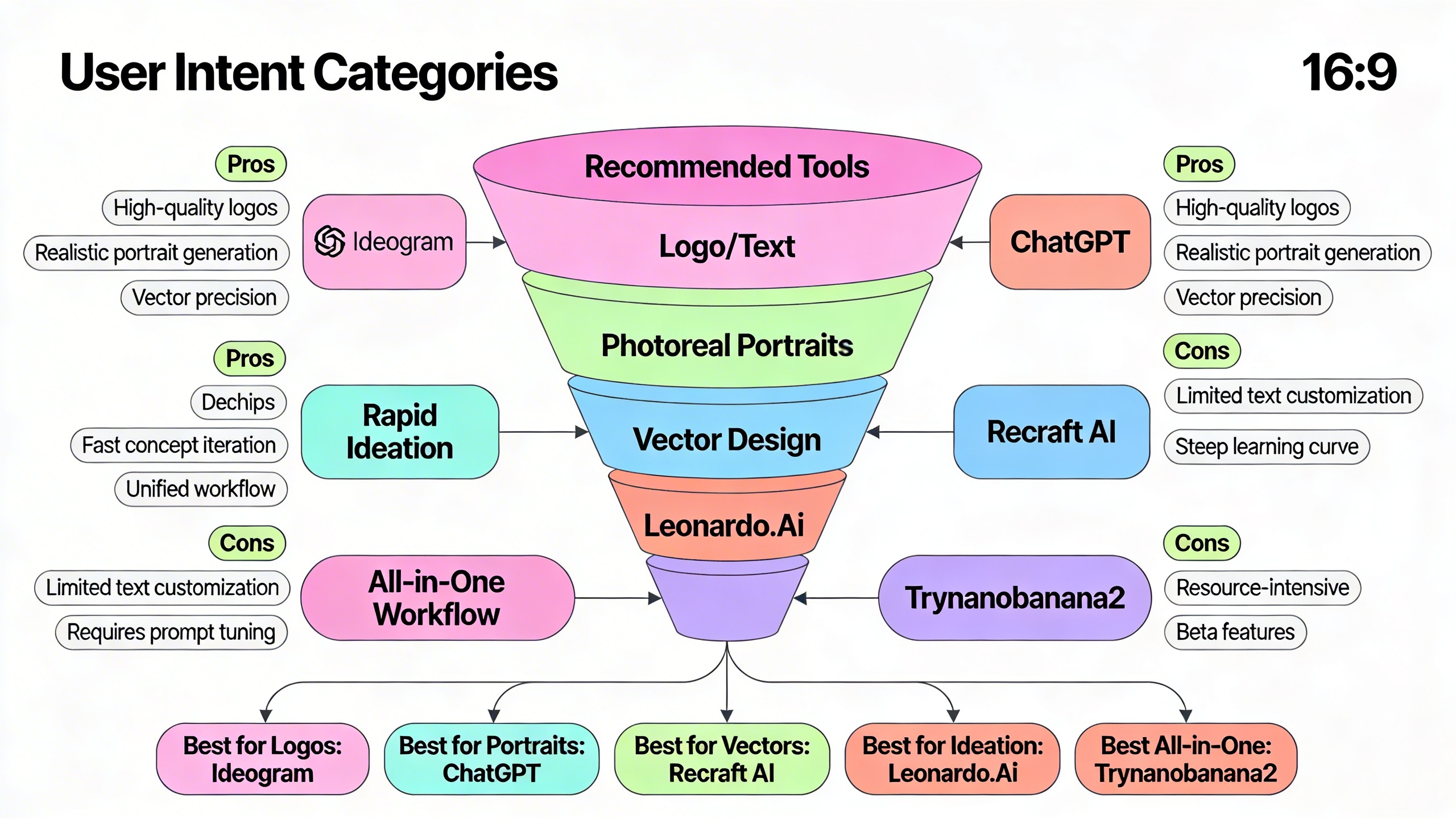
- If you need accurate text for a poster out-of-the-box, go with Ideogram.
- If you are an advanced artist needing commercial rights and deep pipeline control, Leonardo.Ai is your powerhouse.
- If you are a graphic designer who absolutely must have scalable SVG assets, Recraft AI is unmatched.
- If you just want to brainstorm ideas conversationally, ChatGPT remains incredibly intuitive.
However, if you want the ultimate flexibility—the ability to experiment with multiple top-tier models, generate high-resolution images rapidly, and manage a suite of AI creative tools from a single, streamlined interface—Trynanobanana2 is the clear standout recommendation for 2026. By aggregating the best models available (including the Gemini 2.5 architecture), it provides a one-stop-shop that saves time and maximizes creative potential.
Frequently Asked Questions (FAQs)
Are free AI image generators really free?
Yes, but usually with caveats. Most platforms operate on a "freemium" model. They provide a daily or monthly allowance of "credits" or "tokens" that refresh over time. Once you exhaust those credits, you must wait or pay for a premium subscription. Additionally, some platforms might restrict certain high-end models or high-resolution downloads to paid users.
Can I use AI-generated images for commercial purposes?
It depends entirely on the platform's Terms of Service. In 2026, platforms like Leonardo.Ai and ChatGPT generally allow commercial use of images generated on their free tiers. However, platforms like Recraft AI explicitly prohibit commercial use unless you are on a paid plan. When using an aggregator like Trynanobanana2, it is best practice to verify the licensing of the specific underlying model you choose to render with.
Which AI generator is best for realistic photos?
Models utilizing advanced diffusion architectures, such as those found on Leonardo.Ai (when using their photo-real finetunes) or the high-end architectures accessible via Trynanobanana2, currently offer the most convincing photorealism, excelling at skin textures, lighting, and realistic eye details.
Can AI generate words correctly now?
Yes! While it was a major flaw in 2023 and 2024, by 2026, models have vastly improved. Ideogram leads the pack with near-perfect text generation, and the Google Gemini architectures (accessible via Trynanobanana2) also excel at understanding and rendering typography within scenes.
Conclusion
The era of struggling with clunky, low-resolution AI image generators is over. In 2026, the free tools available to creators rival the quality of expensive photography and custom illustration. Whether you are building brand assets, conceptualizing art for a game, or simply generating visually stunning posts for social media, there is a free tool tailored for your exact needs.
Stop juggling a dozen different browser tabs and restrictive free trials. Streamline your workflow, access multiple industry-leading models, and bring your imagination to life in seconds.
Ready to explore the pinnacle of AI image generation? Experience the all-in-one power of Trynanobanana2 and revolutionize your creative process today.